


Add-on keys are a great way to get the required custom keys for your computer (Apple/Mac, HHKB, etc.) and also to personalize your keyboard with useful legends that will maximize your productivity, fun legends like novelty keys, historical or universal legends like icons, and those from terminal keyboards of the past 50 years of computing. Most individual keys are $3 each, while some are $7.
What's available: Hundreds of custom legend key sets are currently available both individually and as part of various themed sets.
Can I order keys individually or must I buy the whole set? You can order keys individually through the "Individual Keys" category in the shop and on the keyboard configurator pages, but many people end up buying the complete set which is often a better value.
Where do I find the various keys and how are they organized?
There are key sets of various custom legend groupings such as those for the IBM 4704, Apple/Mac F1 to F15 and 6 Key Mac Text/Icons, Colemak, Dvorak, Ergodox, Extras, F13-F24, HHKB Front Print, Icons, Industrial SSK 12 Key Set, Media Icons, Media Text, Mopar Blue, Buckling spring logo and other novelties, Ortholinear, Scumnc, SSK Num Pad, and Terminal. The images of the key sets show the keys in their default color offerings only, though they are usually available in other options by changing the color drop down menu.
For ease of organization in the shop, the Key Sets product category offers all the above-listed sets in one "Add-on Key Sets" product. There are separate product listings where you can buy all of the various other groups of key sets: Base Key Sets (the usual full ~104 key sets), Front Print F Row (the 12 number row keys populated with F1-F12 front printing (great for F62/F77 and for those who want function key access for example by pressing Fn+1 to get F1, etc.), HHKB 6 Key Sets (international language variants and icon variants also available), Pad Printed White Text Model F Key Sets, and Right Side Blocks.
The red boxes around the keys: You'll see most keys have a box around the image; these boxes are not printed on the keys but are just there to show the placement of the legend on the key and the size of the key. The size is 1U unless otherwise noted. When something is shown below the box, that indicates what will be front printed on the keycap.
Two main ways to buy extra keys: This recently updated project site allows everyone to purchase add-ons including key sets directly while configuring a keyboard, and also they can purchase them separately by going to the various product pages in the shop page. The keyboard configurator pages also have links to purchase individual keys, which open up in a new window (too complex to offer them while on the keyboard configurator pages). Additionally, you can purchase individual keys (including blank unprinted keys and transparent relegendable keys) directly through items in the "Keys" product category on the shop page. Almost every key has an image showing the legend of the key.
Can I edit my order before submitting it? Yes. Regardless of whether you order them with the keyboard configurator or separately, you can adjust the quantity and add or remove them from the cart without having to remove everything and start over. Each item is added to the cart as a separate item even if you order it on the keyboard configurator page.
The most popular recommendation is the Industrial SSK 12 key set: this gets your keyboard looking like the ultra-rare IBM Industrial SSK and its custom-made legends. A nice and popular touch for these great old style keyboards.

Important Terms:
Only the listed options, sizes, and colors are available; no other custom legends. You can buy almost every single key individually, with the exception of the following keys only sold as part of the full set: Industrial SSK 12 key legends, Apple/Mac, Front Printed F Row, F13-F24, Mac, and the Right Side Block key sets. If you are replacing a damaged key or need an exception, I have some extras of those sets so just email me, but pricing may be higher ($4 to $7 instead of $3). As a note key legends are not finalized and are subject to change. The HHKB set legend is Ctrl and not spelled out Control, though you can purchase an extra 1.75U control key (no substitutions are allowed though).
Just about every key is available in every color except black which does not offer any printed keys, and except for pearl modifiers, which are not offered (also many pebble keys are not available in pearl and vice versa; if you order a key in pearl that is not available or if you specify All Pearl or All Pebble, you agree to receive a pebble key or a key in the normal color instead of your requested color). For pearl/pebble key sets they come as pictured; you can’t change some keys to pebble and others to pearl for example; however your key may come in pearl or pebble if you request pearl/pebble, based on current stock availability (you are not guaranteed to receive the color that is pictured below). Other examples of keys not available in All Pearl or All Pebble are full key sets, F13-F24, and other sets with many keys; if you specify All one color you agree to receive the default colors. Some key sets are offered only in All Pearl or All Pebble (examples: media keys and Novelties); if you pick Pearl/Pebble you agree to receive the set in all pearl or all pebble, my choice based on available stock. Another example, Mopar Blue is only available in blue and dark gray. In other words, by ordering from this page you are not guaranteed to receive keys in a requested color that is different from the stocked color options; your keys may differ in color from the colors and legends pictured. Your key request must match the size in the images below. I cannot provide a key in a different size.
The shorter spacebar is a tight fit with a 1.5U key; you could use a 1.25U key instead but there would be a 1-2mm gap between space bar and the new key.
You are responsible for updating the Vial firmware GUI if you choose custom keycaps or custom right side blocks; this is not done for you if you just purchase an extra right side block set, for example.
Key colors (from left to right: Pebble, Pearl, Black, Industrial SSK Blue, 60% Dark Gray):
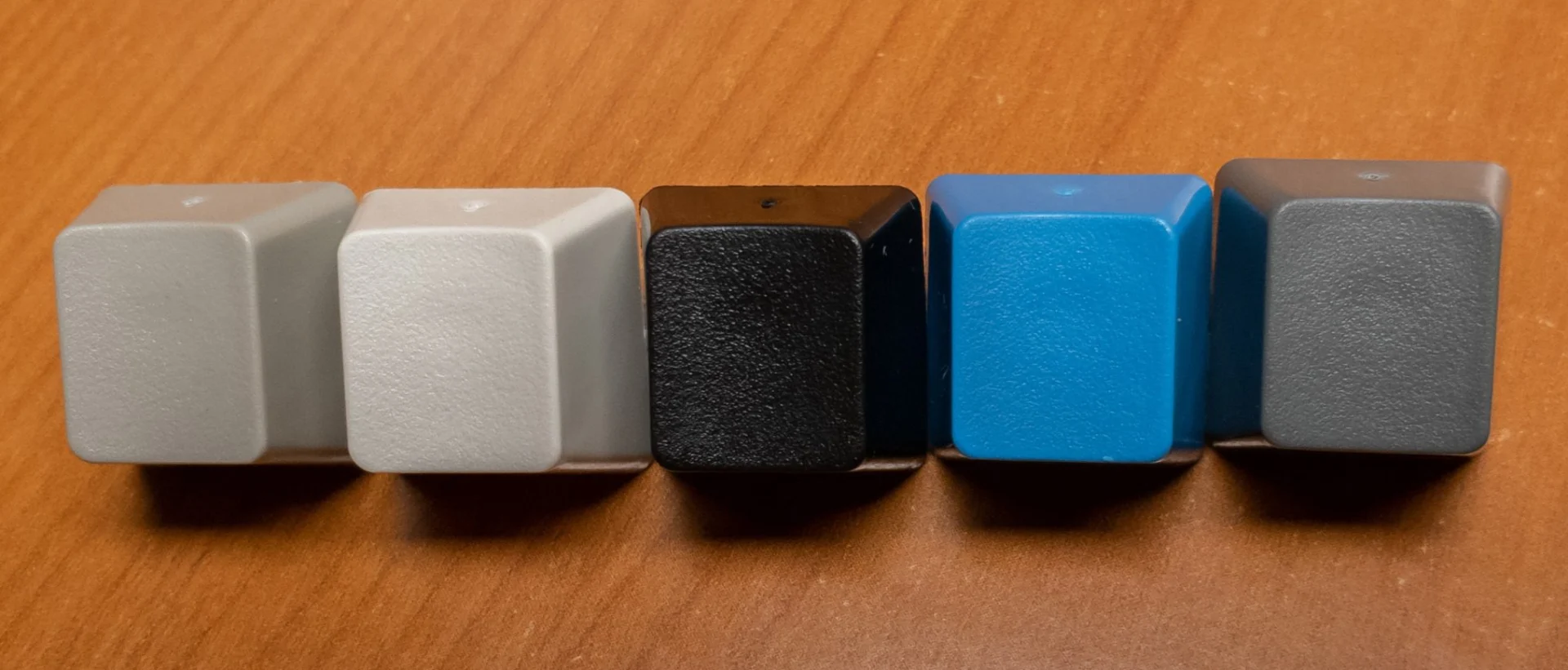
Click here for text descriptions of each key
Icons Row 1 (Unicode in parentheses):
- ← Backspace
- ← Backspace
- ⇥ Tab
- ⭾Back and Front Tab / Horizontal Tab (U+2B7E)
- 🔒 Caps Lock (U+1F512)
- 🔒 Caps Lock (U+1F512)
- ⇪ Double Shift or Caps Lock
- ↵ Return / Enter
- ↵ Return / Enter
- ⇧ Shift
- ⇧ Shift
- ⇧ Shift
- ⇧ Shift
- ⌘ Command (Apple/Mac)
- ⌃ Control (Apple/Mac)
Icons Row 2:
- <X| Backspace / Erase to the Left (U+232B)
- <X| Backspace / Erase to the Left (U+232B)
- <X| Backspace / Erase to the Left (U+232B)
- ⎋ Escape (Apple Escape) [unicode U+238B]
- O–>[ ] IBM print screen
- Padlock with the Up and Down arrow: Scroll lock
- ⎉Pause / Circled Horizontal Bar with Notch [U+2389]
- a^ Insert IBM-style
- a with curved line: Delete
- ⌦Delete / Erase to the Right (U+2326)
- ↖ Home / North West Arrow [U+2196]
- ↘ End [unicode U+2198]
- ⇞ Page up / Upwards Arrow with Double Stroke [U+21DE]
- ⇟ Page down / downwards arrow with double stroke [U+21DF]
- Padlock with the number “1” Num lock
- ⎇Alt key with arrow (U+2387)
- ◇Meta / UNIX-style super key / Diamond [U+25C7]
- ⌃ Control 1.5U
- ⌥ Option (alt) 1U [unicode U+2325]
- ⌘ Command 1.5U
- ⇮ Upwards Double Arrow (U+21EE)
- List icon
- ƒ Function / F with a hook [unicode U+0192]
- ↵ Return / Enter
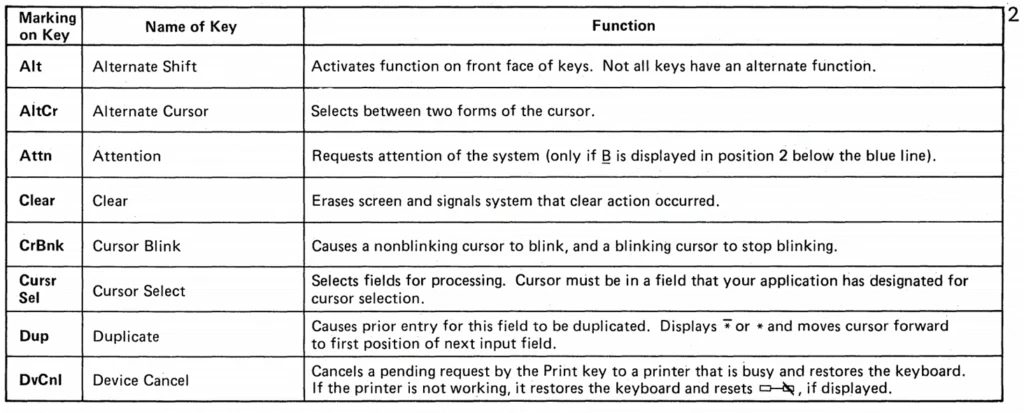
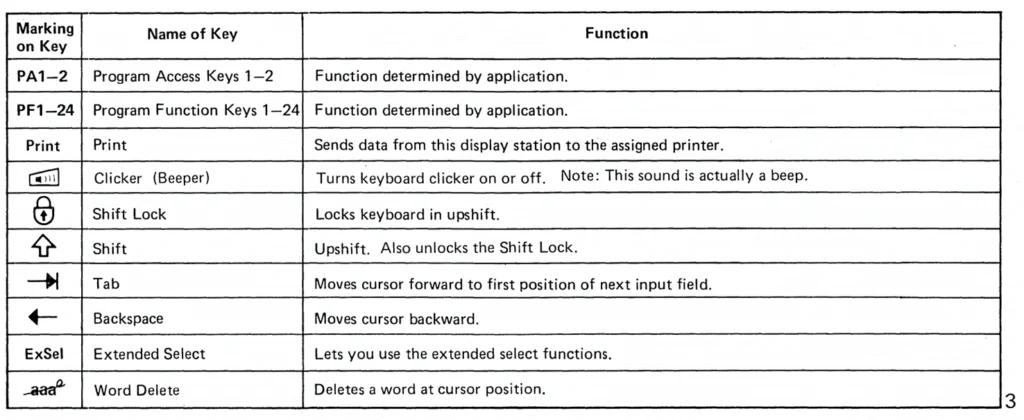
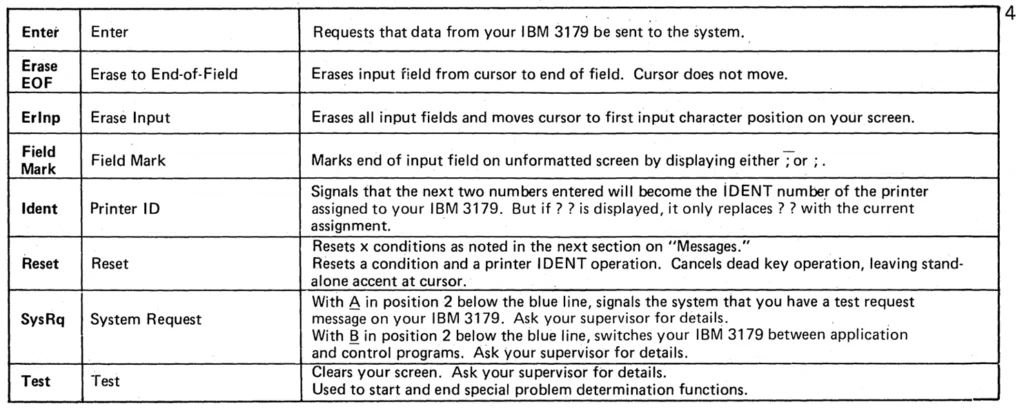
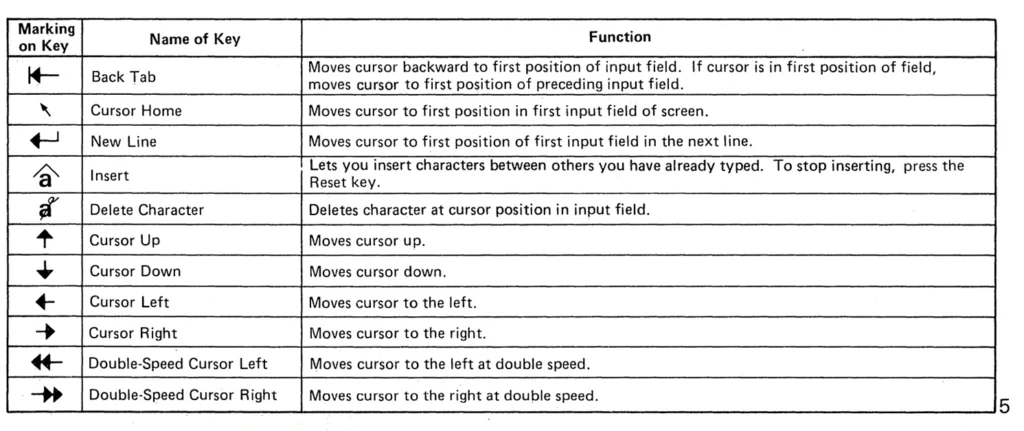
I came across some old files describing some of the IBM Key legends and key descriptions for the key functions on their keyboards – hope it might be of interest. I had no idea what many of these keys actually did on the old terminals! Copied below are pages from the IBM 3179 (F122 keyboard). Please note that if you only see the key below and not in the above list, you cannot order the key.
Click to View Images