
***If you have a new shipping address please do email me to let me know your order numbers and the new address. Check your order email and our email communications (if applicable) to make sure the latest address I have on file for you is the correct one.
(As a brief update, the container ship arrived recently and I have been busy mailing out lots of keyboards and will continue to go through the backlog over the coming months – sorry I cannot provide estimates for any particular order in the queue as noted before; please see the below posts for additional details. Since I ordered a bunch of extra keyboards, there is still time to customize your Brand New Model F Keyboard and add on accessories like the First Aid Kit for future repairs, the new solenoid driver and extra hefty solenoid, the transparent relegendable keycaps just made from new molds, extra key sets and USB cables, etc.)
So far I have mailed out more than 1,000 Brand New Model F Keyboards since early April, which is more than half of the remaining backlog. We have about 850 keyboards remaining in the backlog. My expectation remains as before, that I can expect to move through the rest of the backlog in June and July. As noted before, it is not possible to project the timeline 100% based on last month’s progress as each order takes a different amount of time and orders with many individual extra keys will take much longer to process; many of the remaining orders are disproportionately ones that have such keys while the “all in stock” orders have been able to go out already.
This week another batch of the custom dye sublimated keys is arriving by express / air mail from the factory so many more orders will be “all in stock” and eligible to ship. The only remaining custom keys the factory is finishing up in the next couple weeks is the HHKB Front Print, Extras, SSK Num Pad, 4704, Terminal, and Ergodox sets.
Interest Check: Pad Printed New Model F Keys
I am reviewing samples for the pad printing with the plan to offer white text on black keys, which is a common request. If interested in black pad printed Model F / Model M keys please sign the interest form here to reserve your set: https://forms.gle/qnUATUrng8bX9Qxt8
Interest Check: ISO Black, Dark Gray, and Industrial SSK Blue key sets, Code Keys, Big PC AT style Enter Keys?
I am looking into making a mold for the ISO Enter key (currently we are using Unicomp keys for this key as noted before, and they cannot make the additional colors for black and for gray and blue to match my project’s key colors). This would allow for key sets with ISO Enter to be made in additional project colors black, 60% dark gray, and Industrial SSK Blue. I will probably make the key non-stepped just like the other keys are all non-stepped.
If you are interested please fill out the Google form below to note which sets you’d like. To help pay for the mold each set will cost $20 extra, a total of $99 instead of $79 for each set. The key could also be ordered for $20 individually.
Since I am making a mold would any other keys be worth adding that have not been made before? I don’t think the big PC AT enter key or code key would have enough interest to merit $1000 extra for the mold costs but it would be lower than having a completely separate mold. Please post on the Deskthority project thread if you have any recommendations.
Major Project Milestone – 2 million dollars in orders!
Today we reached a major project milestone of 2 million dollars in Brand New Model F orders! It is very surprising to me that there has been so much interest in this project. This figure includes accessory orders and shipping costs.
A note on setting up your new Model F Keyboard
As I have mailed out more than 1,000 new Model F keyboards in recent weeks, a lot of folks have asked questions or expressed issues with setting up their new Model F Keyboard. An important reminder is to fully review the manual and watch the videos in the manual before setting up your keyboard so you do not waste your time attempting fixes that do not effectively solve an issue.
Every recommended fix is in the manual; fixes not written there are not recommended! If a key does not work for example, many folks lose an hour removing and re-seating the same key or performing other steps which do not solve the problem. Check out the installation videos showing how to hold the keyboard up vertically, space bar end up, for example – otherwise many keys will not work. What one should do is noted in the manual: focus on adjusting or replacing the spring which is almost always the culprit as these keyboards are unfortunately bounced around in shipping. Also having the right tweezers or other tool to push down the spring enough without damaging it is very important. Check out the manual at modelfkeyboards.com/manual and the Quality Control Secrets Revealed video embedded in the manual. The manual also covers what to do with a sticky/stuck extra-wide key (check out the “wiggle” method).
Some folks are flashing the wrong firmware and softbricking their keyboards because they did not see the notes in the manual (FYI use the “wcass” firmware and not the xwhatsit, universal, or other version). Please only use the latest firmware – re-download the file at the below link “updated firmware” and do not use files you downloaded previously. Also for Via and Vial please follow the recent month’s posts and my firmware installation video as they are slightly more tricky to install properly. Not to worry, these controllers can’t permanently be bricked to my knowledge; follow the notes in the manual on how to manually enter bootloader mode as a last resort.
As noted in the manual, you will run into a lot of issues if you use a dock or USB hub with these keyboards. Only plug the keyboard directly into your computer. Do not try to flash firmware with the keyboard plugged into a hub or dock.
The two grounding screws on the controllers sometimes need to be retightened as it causes errors like keys appearing out of order or certain key combinations not working correctly.
Please do not be scared about the project because of these reported issues. There is a reason that thousands of folks choose to spend some minutes to learn how to work with a Model F so they can type on these great old style keyboards as their daily drivers! As noted before the main two issues why an individual key does not work is if the spring needs adjustment or if the two controller grounding screws were not screwed tightly enough from the factory. Once you spend some time reading through the manual and watching the videos you will be ready and able to set up your new Model F Keyboard and keep your keyboard running hopefully for many more years, long after the project has shut down. If you follow the instructional videos and instructions in the project web site manual step by step, there are no unsolvable issues.
Updated firmware to fix a bug with solenoids; QMK key combination note
This firmware is only required if your keyboard shipped recently and if you have a solenoid. Previously there was a bug that was preventing solenoids from operating but the latest firmware in the above link (also linked to in the manual) fixes this issue. Follow the written and video instructions in the manual for a step by step guide. This is the same firmware update posted in last month’s update – reposting for increased visibility.
As noted in the manual, your solenoid will not function correctly if you use the QMK configurator web site to generate your firmware, instead of flashing one of the premade firmware files linked to above, though it is an easy fix – please see the manual for more details.
Someone recently found out the cause of an error with a specific key combination in QMK – I am quoting their reply below:
“There was a question on your Q&A forum (not by me) about the keyboard seemingly locking up when you press left-shift + right-shift + Esc all at the same time. I figured it out, compiling my own QMK: the default firmware you get when you compile it from the beta-QMK website configurator actually compiles with: COMMAND_ENABLE = yes in the rules.mk. To prevent these lockups, you need to define COMMAND_ENABLE = no in the rules.mk. I’ve created my own keymap using that, no lockups (and thus also no hidden magic keys any longer which were not explicitly in the keymap already).” https://www.modelfkeyboards.com/questions/question/keyboard-becomes-unresponsive-when-hitting-shift-shift-esc/
On a somewhat related note, has anyone installed the new production solenoid in another keyboard, like an IBM original F or beam spring keyboard? Hopefully we can see some photos of the solenoid mounting.
QMK configuration request – custom right side blocks 3, 4, and 5
How are folks programming the right side blocks 3, 4 and 5? If anyone has made JSON files that are the same as the ones I provided, but with adjustments for the right side blocks 3/4/5 please do share! I guess the secondary legends are set up as a function layer, or maybe a tap layer to mimic the functionality of the Num Pad key? Some folks have posted configurations for some of these blocks for Via/Vial but not yet for QMK.
Beam Spring Update
The factory continues to finish up the second batch of beam spring round 1 keyboards (the first batch is already in stock as noted before). Please check out the forum threads on the round 2 beam spring keyboards, including a discussion on case design and layout requests. As noted before, orders will be accepted only after I finish up the Model F backlog over the next month or two.
When folks note their interest in a 122 key keyboard, is their specific interest in the exact historical 122-key terminal models with the 24 bunched-together function keys, 5-key cursor design, etc.
Or is it primarily a request for the ability to have more keys than on a standard ~104 key keyboard? 12 extra keys on the top and 10 extra keys on the left side for function keys/custom keys, etc.
Personally I would like a 122 key beam spring keyboard that resembles the Model M 101-key layout but with the extra 12 keys above the 12 function keys, 10 keys on the left which I can use for custom keys (Explorer, media playback, start menu, etc.), the keys between Ctrl and Alt of course, and 3 keys above the Insert/Home/Page Up keys for Print Screen, Scroll Lock, and Pause/Break. I’m not sure if this updated layout would have too much interest.
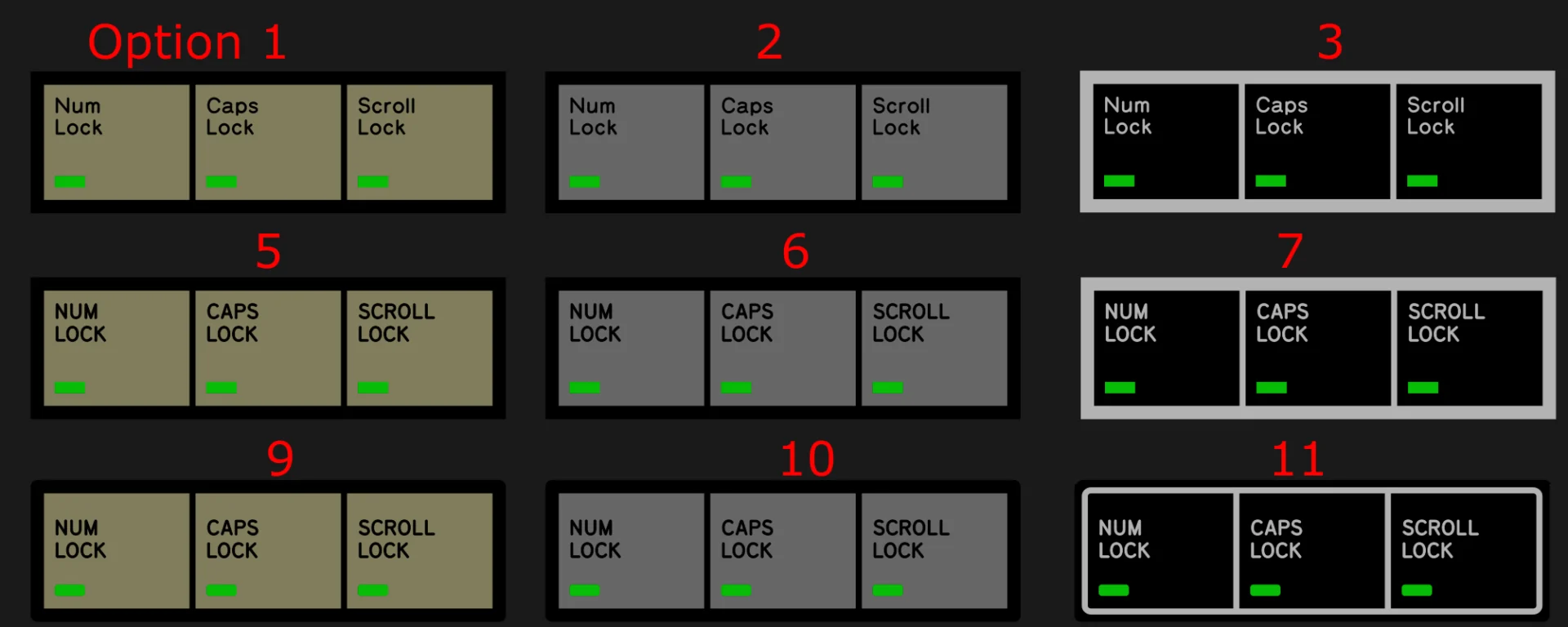
What do folks think about the new beam spring LED overlays? They will be Model M spec so that they can be used on the original Model M keyboards too (maybe if you use the new Model F project keys on a Model M or are custom adding overlays to the F77/F62?). A big thanks to Zed for creating these overlays.
In the coming weeks I expect the factory to start production on these. It may be possible to offer additional designs if there are any suggestions, but not sure yet. There may be a limit of designs so not all of the below designs may be produced.
Measurement help requested – original beam spring cases
For folks who have beam spring keyboards other than the 3278 can you provide measurements or drawings (a photo of a handwritten drawing would be fine) of the side profiles and size of the bezels around the top, bottom, left, and right of the keys? I ask because I only own the 3278 models.
I’d like to get the proportions right in the proposed designs.
I’d request the radius of the curves (one can approximate by measuring a straight line cross section of the curved part of the case), the side profile heights at various points, and the overall length.
Since IBM appears to have designed in inches and fractions of an inch please provide the measurements as such if possible.
If easier to provide the numbers that is fine, or if easier to draw something not to scale and mark the distances that would be good too.
Here’s a nice and detailed Model F review from late last year – I had not come across it until today

New Case Photos
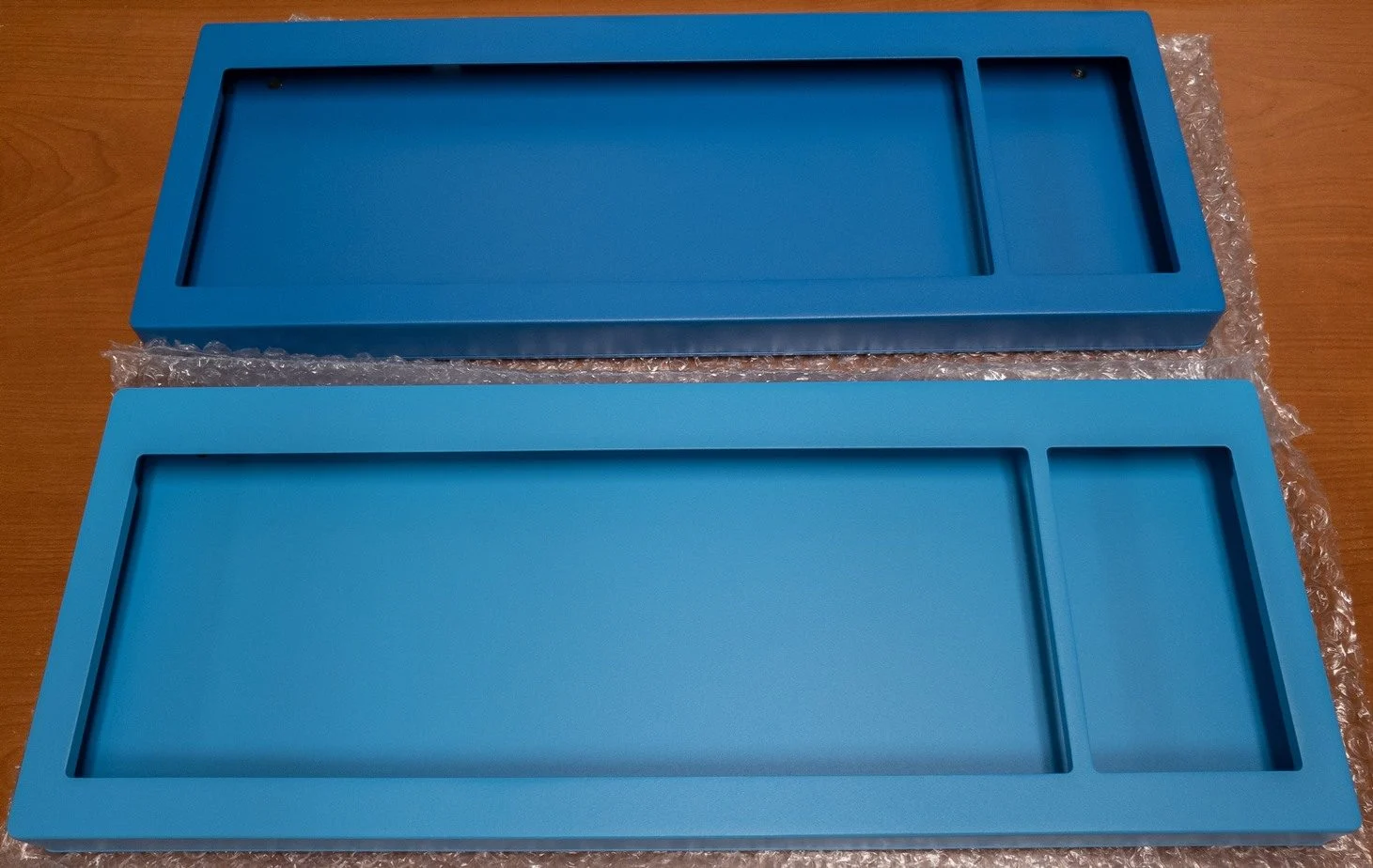
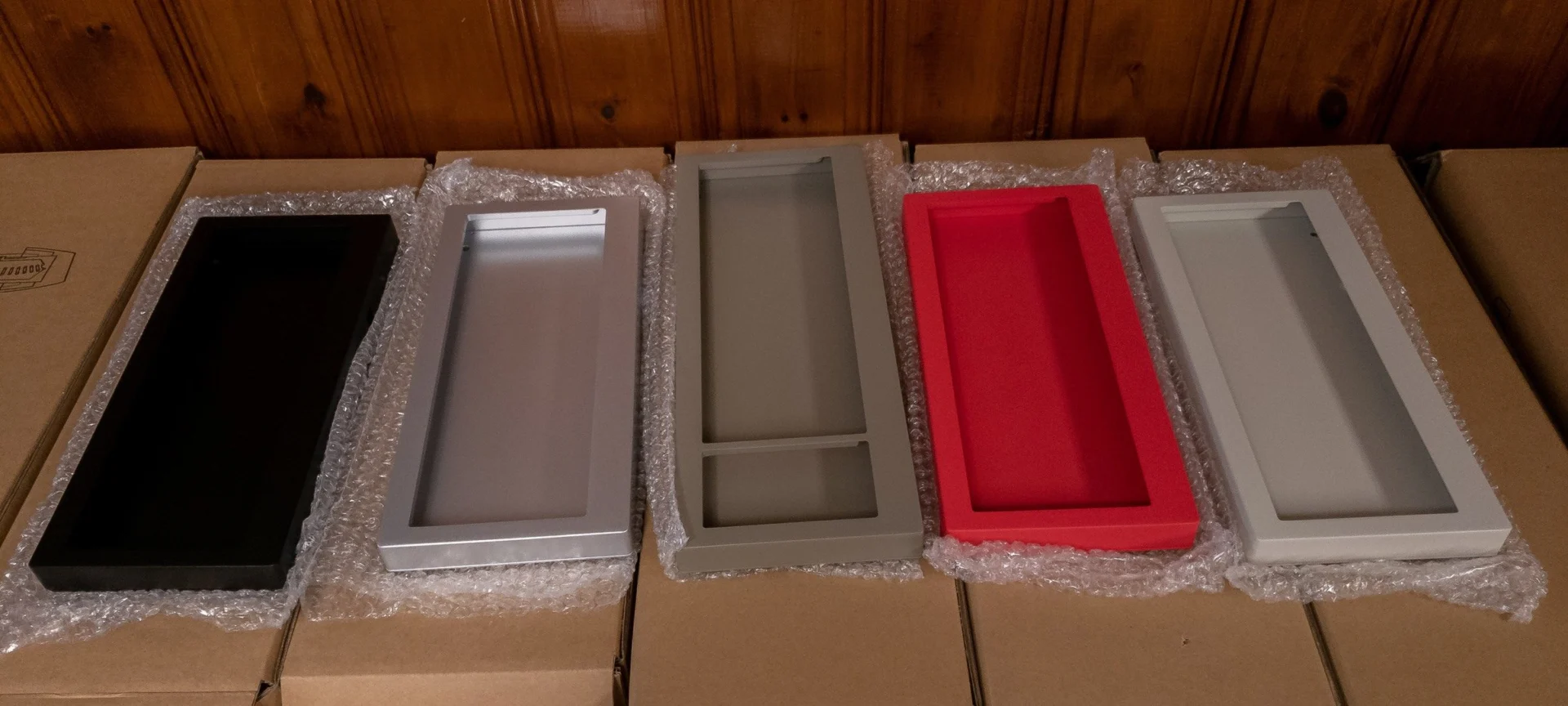
Here are photos showing the new tougher powdercoating option on the compact cases that was mentioned several months ago. Dark Blue (top case) and Carolina (Light) Blue (bottom case) are shown below in the first photo. After that photo you can see photos of the other various cases (from Left to Right in the photo showing all the cases: Black, Regular Gray, Industrial Gray, True Red, Off-White/Beige).
For compact keyboards shipping this year, everyone gets the new improved option instead of the anodized option which was more easy to scratch. The new cases are also from the brand new die cast aluminum molds as noted before (makes the case two piece instead of three piece) The new cases are fully compatible with the older batch of internals in case anyone wanted to upgrade.
Nice photo
I wanted to share a nice photo of a full size 101 key Industrial Model M with the Industrial SSK 12 key set – one of the first photos I have seen of this combination:
2nd Nice Photo
Here is a nice photo (shared with permission) of the Industrial Gray keyboard with the Industrial SSK 12 key set and a right side block arranged in an alternative way.
3rd Nice Photo Set
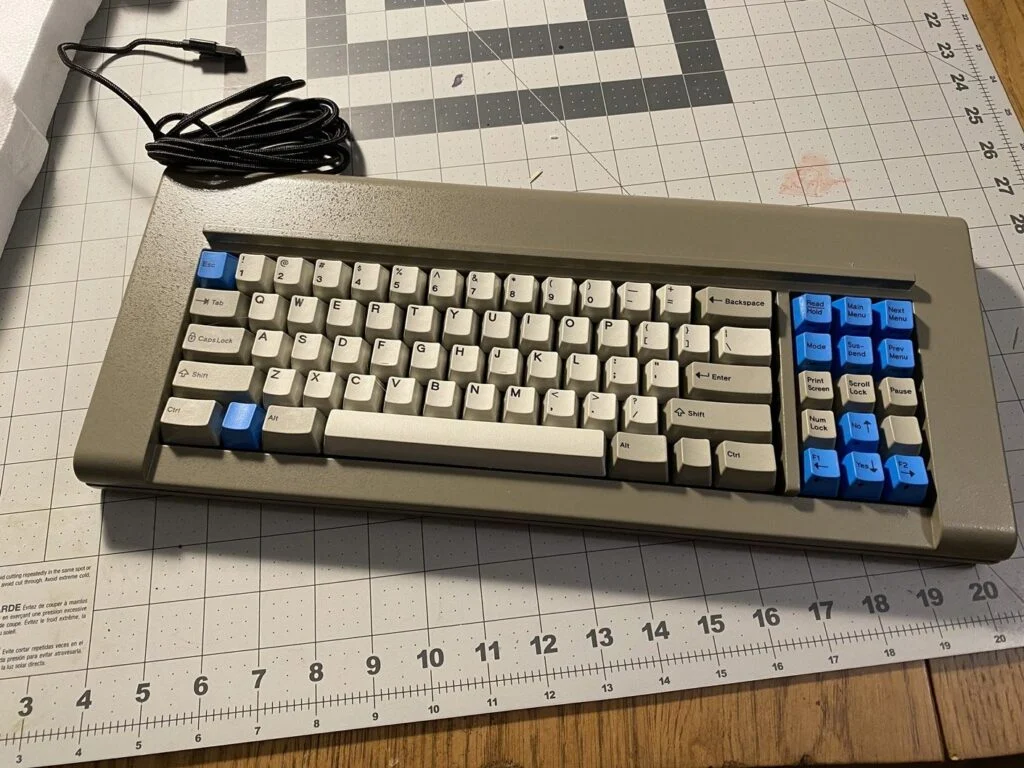
I believe this is one of the first Dark Blue powdercoated keyboard photos that has been shared! I like the use of the buckling spring logo key as perhaps the function key – makes for a nice custom touch for the layout.
New Production Hebrew Key Set
Here’s the new production Hebrew set that is available thanks to Zed making it. It is installed on an F122 (also pictured are some original IBM keys, per the poster):
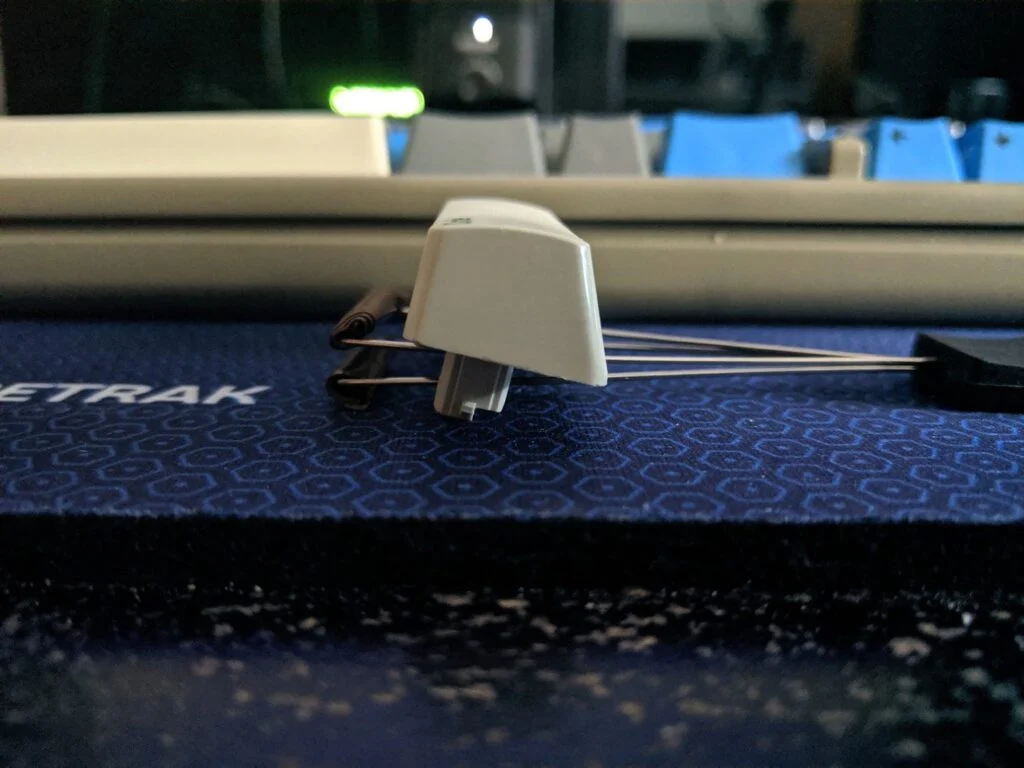
IBM Code Key
I recently received some photos and interesting details on the IBM Code key, a rare buckling spring spacebar-type key found on wheelwriters and am sharing them, with permission:
“I ordered a whole set of the IBM Wheelwriter 3 keys, and I started putting some of them on the Model F.
The Code key is the size of a regular right shift key; it is 2″ long. It does not fit where the right shift goes however, as the bottom stems are in different locations compared to a shift key.
I put mine where it was originally intended to be; the bottom left of the keyboard next to the spacebar. I think it will be my new Ctrl key.
The Code key is the exact same size as Right Shift is 2.75U with different stem and post locations.” [stem and post are switched]
Seems like the code key requires a part of the keyboard arranged in a 1.5U+1.25U location. With the new Model F’s it seems that this example is 1.5U+1U+fitting a 1U key where the 1.5U key would go.
Someone sent me some interesting information on the original functionality of some of the IBM terminal keys
“I found a great video demonstrating what some of IBM’s terminal keys did on a real system.
The title on YT is “IBM 3178 Terminal Operations and Use demonstration” by Carl Claunch
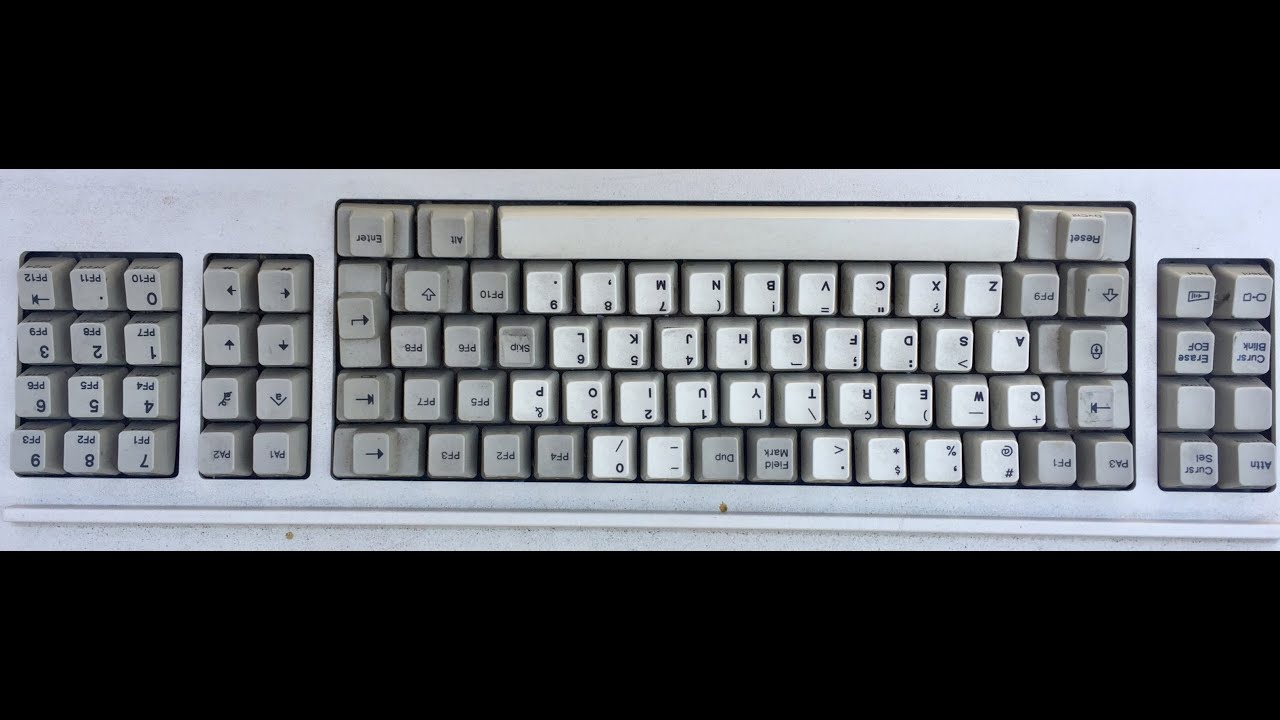
A side note, the “Reset” key works the same as the “Error Reset” key found on other terminals. It dates back to the punch card days; I can link you a manual that details further if you wish.
The IBM 3101’s keyboard has a compartment for storing documentation. Perhaps you could ask if someone still has a pamphlet they might have found in there.”
3d Printed Foot Bar (like the originals)
I’d imagine a foot bar can be 3d printed. I guess the posts would have to be realigned for the spacing on the new Model F Keyboards compared to the 4704 originals. https://www.shapeways.com/product/HDBG8BJNX/ibm-4704-62-key-kishsaver-replacement-foot-bar